# Can You Change Jewelry Color in Photo Editing?
Jewelry photography is an important part of selling rings, necklaces, bracelets, earrings, and other accessories online. Customers want to see accurate product colors, detailed gemstones, and polished metal surfaces before making a purchase. However, photographing jewelry can sometimes produce unexpected color differences.
A yellow gold ring may appear too orange, a silver bracelet may look slightly blue, or rose gold jewelry may lose its natural pinkish tone because of lighting conditions.
These issues can affect how jewelry products appear on websites, catalogs, and advertisements.
Fortunately, professional photo editing can help correct inaccurate colors and, in certain situations, change the apparent color of jewelry.
**Yes, you can change jewelry color in photo editing.** Using tools such as Adobe Photoshop, editors can adjust the appearance of metal surfaces, convert yellow gold into a silver-like finish, create rose gold variations, and correct unwanted color casts.
However, changing jewelry color requires more than adjusting saturation or applying a simple filter.
Professional jewelry recoloring involves careful masking, tonal adjustments, reflection preservation, and attention to the original product design.
The goal is to create a realistic result while maintaining the jewelry's shape, texture, gemstone arrangement, and natural metal appearance.
In this guide, we will explain how jewelry color editing works, which colors can be changed, the techniques professionals use, and when jewelry businesses should consider this service.
What Is Jewelry Color Changing in Photo Editing?
Jewelry color changing is a photo editing technique used to modify the visible color of jewelry while preserving its original design and structure.
This process is commonly called **jewelry recoloring** or **jewelry color replacement**.
It can be used to create visual representations of different metal finishes or correct color problems caused by photography conditions.
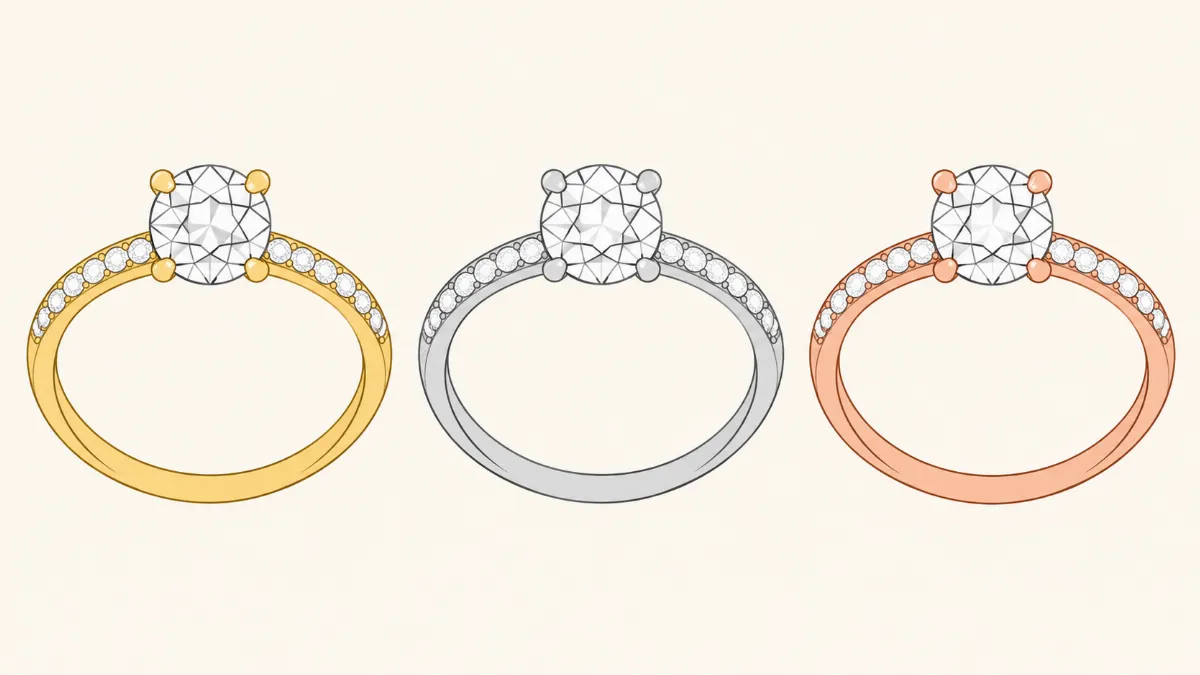
For example, a jewelry manufacturer may produce the same ring design in yellow gold, white gold, and rose gold.
Instead of photographing every variation separately, the business may use professional photo editing to create color variations from an existing photograph.
The editor carefully changes the metal color while preserving the ring's gemstone arrangement, band shape, and surface details.
However, edited color variations should represent real products that the business actually offers. If a color is only a proposed design, it should be clearly identified as a digital preview.
Jewelry color editing can also correct photographs where the original metal color appears inaccurate.
For example, a yellow gold necklace photographed under warm lighting may appear excessively orange.
In this situation, the editor can adjust the color to better match the actual jewelry.
Both techniques involve color adjustments, but their purposes are different.
Jewelry Color Correction vs. Jewelry Recoloring
Although jewelry color correction and jewelry recoloring are related, they are not the same process.
Jewelry Color Correction
Jewelry color correction improves the accuracy of the photographed product's existing color.
For example, a rose gold ring may appear too yellow because of incorrect white balance.
A photo editor can adjust the color temperature and tonal values to restore a more accurate rose gold appearance.
The jewelry remains the same product with the same metal finish.
Color correction is particularly important for online jewelry stores because customers rely on photographs to evaluate product appearance.
Jewelry Recoloring
Jewelry recoloring changes the apparent color of the product to represent a different finish.
For example, a yellow gold ring may be edited to appear like white gold or rose gold.
The editor must modify the metal color while preserving the original shape, highlights, shadows, and texture.
Recoloring is useful when businesses offer multiple color variations of the same jewelry design.
However, it should not be used to misrepresent the material, purity, or finish of the actual product.
Main Differences
| Feature | Color Correction | Jewelry Recoloring |
|---|---|---|
| Main purpose | Restore accurate colors | Create another color variation |
| Example | Fix orange-looking yellow gold | Change yellow gold appearance to rose gold |
| Product design | Preserved | Preserved |
| Original metal color | Maintained | Visually modified |
| Common use | Product photography cleanup | Product variation previews |
| Editing difficulty | Basic to advanced | Moderate to advanced |
Understanding the difference helps jewelry businesses choose the appropriate editing service.
What Jewelry Colors Can Be Changed Through Photo Editing?
Professional photo editing can create several jewelry color variations.
The success of the process depends on the original photograph, the metal finish, lighting conditions, and the desired result.
1. Yellow Gold to White Gold or Silver
Changing yellow gold into a silver-like appearance is one of the common jewelry recoloring requests.
The editor reduces the yellow and orange tones while maintaining the original metal highlights and shadows.
However, the process is not as simple as removing saturation.
Polished yellow gold contains reflections and tonal variations that help define the jewelry's shape.
A professional retoucher must preserve these details while creating a believable neutral metallic finish.
White gold and silver may appear similar in photographs, but they are different materials. The edited image alone cannot establish which metal the physical jewelry contains.
For commercial listings, the product description should identify the actual material.
2. Yellow Gold to Rose Gold
Rose gold has a characteristic warm pinkish appearance.
To create this variation, an editor adjusts the metal's hue and color balance while preserving its original reflections.
The amount of pink or copper tone should be controlled carefully.
Excessive saturation can make rose gold appear orange or unnatural.
Professional editors may use reference photographs of the actual rose gold product to match the desired appearance.
3. Silver to Yellow Gold
Changing silver jewelry into a yellow gold appearance requires more than adding a yellow overlay.
Silver contains neutral highlights and dark reflections that must be adjusted to resemble gold.
The editor introduces controlled yellow and warm tones while maintaining the metal's original contours.
For example, a silver bracelet may be recolored to represent a yellow gold version of the same design.
The result should maintain realistic reflections and avoid making the metal appear painted.
4. White Gold to Rose Gold
White gold can be digitally recolored to represent a rose gold finish.
The process involves adjusting hue, saturation, and tonal balance within the metal surfaces.
The editor must separate the metal from gemstones and other components.
This prevents unwanted color changes to diamonds or decorative stones.
5. Changing Gemstone Colors
Jewelry color editing can also modify the apparent color of gemstones.
For example, a jewelry design may be available with different gemstone options.
An editor may create separate product images showing blue, green, or red stones.
However, gemstone recoloring requires particular care.
Different gemstones have unique optical properties, internal characteristics, and color distributions.
Changing a gemstone's hue does not automatically make it look like a different gemstone species.
For accurate commercial images, actual photographs of the available gemstone variations are preferable whenever possible.
How Do Professionals Change Jewelry Colors in Photoshop?
Adobe Photoshop is commonly used for jewelry color editing because it provides detailed control over selections, adjustment layers, and masks.
Professional editors generally use a non-destructive workflow so changes can be adjusted without permanently modifying the original photograph.
Step 1: Examine the Original Jewelry Photograph
The editor first reviews the image to identify the metal surfaces, gemstones, reflections, and background.
This stage helps determine which areas should be recolored and which must remain unchanged.
For example, a diamond ring may contain a gold band, white diamond, and dark reflections.
Only the metal band should be modified if the client requests a gold-to-silver color change.
Step 2: Create an Accurate Selection
The editor selects the jewelry areas that require recoloring.
Photoshop tools such as the Pen Tool, selection brushes, and layer masks can help isolate the metal surfaces.
Precise masking is particularly important around gemstone prongs, chain links, and small decorative openings.
Poor masking may cause color changes to spill onto gemstones or backgrounds.
Step 3: Adjust Hue and Saturation
Hue and Saturation adjustment layers can modify the metal's visible color.
For example, reducing yellow saturation can help prepare a gold ring for a neutral metallic appearance.
However, the editor must also adjust tonal balance to maintain realistic metal reflections.
Simply reducing saturation may create a dull gray surface.
Step 4: Refine Color Balance
Color Balance and Curves adjustments can help refine the new metal appearance.
For rose gold, the editor may introduce carefully controlled warm and pinkish tones.
For white gold or silver, the editor may reduce excessive warmth and maintain neutral highlights.
Reference images are useful for matching the actual product finish.
Step 5: Preserve Highlights and Shadows
Natural highlights and shadows help define the jewelry's shape.
If these are removed, the recolored jewelry may appear flat.
Professional editors use masks and blending techniques to preserve the original tonal structure.
This helps maintain realistic metal surfaces.
Step 6: Protect Gemstones and Fine Details
Gemstones, prongs, engravings, and other important components require careful attention.
The editor checks that the recoloring process has not changed the gemstone arrangement or jewelry structure.
For example, a yellow gold ring containing white diamonds should retain the diamonds' original appearance unless the client requests a separate, accurately represented gemstone variation.
Step 7: Perform Final Quality Control
The editor compares the recolored image with the original photograph and the intended product reference.
This helps identify unnatural colors, masking errors, and inconsistent reflections.
The final image should preserve the jewelry's original design while accurately representing the intended color variation.
Why Do Jewelry Businesses Use Jewelry Recoloring Services?
Jewelry recoloring offers several practical advantages for businesses that sell products in multiple finishes.
Create Multiple Product Variations
Many jewelry collections include the same design in yellow gold, white gold, and rose gold.
Professional recoloring can help businesses prepare visual previews of these variations.
For example, a ring design available in three metal colors may require separate product images for each option.
If the design and surface finish are identical apart from the metal color, recoloring may provide an efficient starting point.
However, businesses should verify the edited images against the actual products before publishing them as product photographs.
Reduce Some Photography Expenses
Photographing every jewelry variation can require additional studio time, product preparation, and image processing.
For certain collections, professional recoloring may reduce the number of separate photographs needed.
For example, a jewelry manufacturer with several identical ring designs in different metal colors may use recoloring for selected product views.
However, digital recoloring cannot accurately reproduce every difference in material behavior, surface finish, or gemstone appearance.
Actual product photography remains important when variations have meaningful physical differences.
Maintain Consistent Product Presentation
Photographing different jewelry variations on separate days may produce changes in lighting, camera angle, and background.
Recoloring from a common source photograph can help maintain consistent positioning and composition.
This makes it easier for customers to compare available color options.
Consistency is especially useful for online stores displaying several variations of the same product.
Support Jewelry Marketing Campaigns
Jewelry recoloring can also be useful for preparing promotional concepts.
For example, a jewelry brand may want to preview how a ring design would appear in rose gold before photographing the final product.
Digital color variations can help designers and marketing teams evaluate different visual options.
These images should be identified as previews when they do not represent finished products.
Can Jewelry Recoloring Look Realistic?
Yes, jewelry recoloring can look realistic when the original photograph is suitable and the editing is performed carefully.
However, realistic results depend on several factors.
The first is the quality of the original image.
A sharp photograph with controlled lighting and clear metal surfaces generally provides a better starting point than an image containing severe blur or overexposed reflections.
The second factor is accurate masking.
If the editor cannot separate the metal from gemstones and backgrounds, the color change may affect unrelated areas.
The third factor is preserving natural tonal variation.
Metal surfaces should contain realistic highlights, shadows, and reflections.
Applying one solid color across the entire jewelry piece often produces an artificial appearance.
Finally, accurate reference photographs can help match the desired metal finish.
For commercial product images, the finished result should be compared with the actual jewelry variation whenever possible.
Common Mistakes When Changing Jewelry Colors
Jewelry recoloring requires careful editing to avoid unrealistic results.
Applying a Single Color Overlay
One common mistake is placing a solid color layer over the entire jewelry piece.
This can remove natural reflections and make the metal appear painted.
Professional recoloring uses controlled adjustments that preserve the original tonal structure.
Changing Gemstone Colors Accidentally
Poor masking may cause the metal color adjustment to affect nearby diamonds or gemstones.
For example, changing a gold ring into silver should not introduce unwanted blue or gray tones into the diamond.
Editors should inspect gemstone edges and prong areas carefully.
Using Excessive Saturation
Strong saturation can make yellow gold look orange and rose gold appear overly pink.
Color adjustments should be based on accurate product references rather than visual intensity alone.
Removing Natural Reflections
Reflections are part of how polished metal communicates its shape.
Removing too many reflections can make jewelry appear flat.
A realistic recoloring process preserves controlled highlights and darker areas.
Ignoring Product Accuracy
Perhaps the most important mistake is creating an edited variation that does not match the actual product.
For example, changing a silver ring photograph to yellow gold does not mean the product is made from gold.
Jewelry businesses should make sure photographs and product descriptions accurately represent the materials being sold.
Can You Change Jewelry Colors Using Mobile Apps?
Yes, mobile photo editing applications can perform basic jewelry color adjustments.
Applications such as Adobe Lightroom, Snapseed, and Picsart provide tools for changing hue, saturation, color temperature, and tonal balance.
For example, Lightroom can help correct yellow gold that appears too orange.
Snapseed can adjust color balance and selected areas of a photograph.
Picsart offers creative color editing tools that may be useful for simple visual previews.
However, mobile applications may be less suitable for complicated jewelry recoloring.
Thin chains, detailed prongs, small gemstones, and highly reflective surfaces require accurate selections.
Desktop software generally provides more precise control for these tasks.
For simple color correction, mobile applications may be sufficient.
For commercial jewelry recoloring, especially when product accuracy is important, professional editing is often the more reliable option.
How Much Does Jewelry Color Changing Cost?
Jewelry recoloring prices depend on the complexity of the product, the quality of the original photograph, and the number of color variations required.
Simple metal color adjustments may cost less than detailed recoloring involving gemstones, complicated reflections, and intricate metalwork.
The following table provides illustrative budgeting estimates.
| Jewelry Color Editing Service | Estimated Cost Per Image |
|---|---:|
| Basic jewelry color correction | $1–$3 |
| Simple metal recoloring | $2–$5 |
| Gold to silver or rose gold | $3–$8 |
| Detailed jewelry recoloring | $5–$12 |
| Complex gemstone color editing | $8–$20+ |
These are general planning estimates rather than verified industry averages or quotations.
For example, changing the color of a simple gold band may require less editing time than recoloring a diamond necklace with numerous gemstones and metal components.
Businesses with multiple images or color variations should request a quotation based on their actual requirements.
How to Choose a Professional Jewelry Recoloring Service
Choosing the right jewelry recoloring provider is important for maintaining accurate product photographs.
Start by reviewing before-and-after examples.
Look for realistic metal colors, clean gemstone edges, preserved reflections, and consistent product details.
Ask whether the provider uses manual masking and non-destructive editing techniques.
These methods can help maintain control over detailed jewelry components.
It is also useful to provide reference photographs showing the desired metal finish.
For example, if you want a yellow gold ring recolored to rose gold, provide an image of the actual rose gold product or a reliable material reference.
Discuss turnaround times, revisions, and file requirements before starting the project.
For larger orders, request a sample edit to evaluate the results.
A sample can help confirm that the recolored jewelry matches the intended appearance before processing the entire collection.
Frequently Asked Questions About Jewelry Color Editing
Can you change a gold ring to silver in Photoshop?
Yes. Photoshop can change the visible appearance of a gold ring to a silver-like finish using masking, color adjustments, and tonal corrections. However, the edited image does not change the physical material of the ring.
Can you change yellow gold to rose gold in a photo?
Yes. Yellow gold can be digitally recolored to represent rose gold. The editor adjusts hue, saturation, and color balance while preserving the ring's reflections and surface details.
Does jewelry recoloring change the original design?
Proper jewelry recoloring should preserve the original design, gemstone arrangement, proportions, and structural details. The intended change should be limited to the requested color variation.
Can gemstone colors be changed through photo editing?
Yes, gemstone colors can be modified digitally. However, accurate gemstone representation requires careful attention to natural color distribution, transparency, and optical characteristics. Actual photographs are preferable when the gemstone variation differs significantly.
Is jewelry recoloring suitable for online stores?
Jewelry recoloring can be useful for showing genuine product variations. However, businesses should verify that edited photographs accurately represent the products available for purchase. Conceptual variations should be identified as digital previews.
Can I recolor jewelry using my smartphone?
Basic color adjustments can be performed using mobile editing applications. However, complicated jewelry recoloring often requires more precise masking and editing controls than mobile applications provide.
Final Thoughts
Jewelry color changing is a useful photo editing technique for businesses that offer multiple metal finishes or need to correct inaccurate product colors.
Professional editing can create visual variations of yellow gold, white gold, silver, and rose gold while preserving the jewelry's original shape and details.
However, successful jewelry recoloring requires more than applying a filter or changing saturation.
Accurate masking, controlled color adjustments, natural reflections, and careful quality inspection are necessary for realistic results.
For jewelry businesses, recoloring can support product variation previews, marketing materials, and consistent online catalogs.
The most important consideration is product accuracy.
Edited jewelry photographs should represent the actual products being sold or be clearly identified as digital previews.
**Looking for professional jewelry recoloring services?** An experienced jewelry photo editing team can help create accurate metal color variations, correct unwanted color casts, and prepare consistent jewelry product images for online stores and catalogs.